This solution uses “RefactorxApiService” as single point for accessing server API, it:
Injects bearer token to each request
Transparently handles 401 with expired tokens to refresh token and retry request
The solutions has “RefactorxPermissionGuard” — assign it to routes, and use permission:
‘?’ — allow only anonymous users
‘!’ — allow only authenticated users
‘*’ — allow any user
Assign “RefactorxRedirectComponent” to route and array of permission/target pairs, once the route is hit, all pairs will be checked sequentially, target for first passing permission will be used as navigation redirect target
Use [refactorxPermission] directive to show hide elements by checking permission, example: [refactorxPermission]=”!”
RefactorxApiService counts all request/response statuses, and provides “loading” event when there is at least one currently executing requests
Generating private key on the server
Generate private key. Use some password. openssl genrsa -des3 -out private.pem 2048
Get private key in PEM format openssl rsa -in private.pem -out private_unencrypted.pem -outform PEM
From time to time I try to rethink the architecture of an application I work on, do some sanity check, find hidden things which were not realized before, make them explicit.
During last such procedure, I have identified the following building blocks for CQRS app.
CQRS application consists of at least several independently running processes,
There are
- a process for making action on business domain
- a reaction to that action through backend workflow process (hosting sagas or process managers)
- a separate process for building a read model
You want to be able to easily host those independent functionalities in one or more processes, configure them to work cooperatively, and do this in response to business needs - there are different clients, many bounded contexts, many environments, many infrastructure variations
So the pain I was feeling is how to effectively bootstrap a process and explain it how to cooperate with other processes in a big picture.
At this stage I identified four groups for functional units I call features or modules.
Those groups are:
- kernel
- context specific
- infrastructure
- host
In kernel there are the following features (building blocks)
- event
- domain (depends on event)
- event provider (depends on event)
- query
- projection (depends on event, event provider and query)
- api
- scheduler (depends on event)
- saga (depends on event, event provider, domain and scheduler)
kernel is not bound to any infrastructure
every feature is implemented with some class inheriting abstract module, and module instance is responsible for doing feature specific task relying on abstractions
(for example domain feature provides Engine, which can execute commands)
context specific group has different number of blocks from context to context, but they can be
- context domain (defines aggregates, and commands/events)
- context query (defines query schema)
- context projection (defines what events from context domain to project to what schema from query)
- context api (exposes UI-specific api, relying on context domain and context query)
- context saga (implements business processes relying on context domain, references context query as well)
infrastructure layer implements abstractions used by features in kernel, and may be (this is an example):
- sql server event store
- katana self hosted web api
- sql server query
- sql server scheduler
- sql server event provider
there may be more than one infrastructure for each feature (kernel module)
and last big group - hosts, hosts are separately hostable services bootstrapping set of functions they host, they may bootstrap a lot of endpoints in a single process or in many separate processes. The typical hosts can be:
- api host (uses katana web api, sql server event store and sql server query for context api which relies on context domain and context query)
- projection worker host (uses sql server event provider, sql server query, context domain events, context query, context projection)
- saga worker host (uses sql server event store, event provider, scheduler and query, with context saga etc)
So there are small features in kernel, they will be reused between many contexts.
Context features and kernel features have no knowledge of infrastructure, the difference between context features and kernel features is - context features implement context specific program logic, while kernel features provide base classes for doing that.
Infrastructure modules also does not need to be coded from context to context, they can be reused, but the infrastructure implements abstractions for kernel, so one context can use one infrastructure while another can use another.
Hosts are the central bootstrappers where you can decide (in one simple class),
- which context modules you host in this process
- which kernel feature abstractions they rely on, and provide infrastructure implementations for those
- provide configuration for this (ports, connection strings, other context connection details etc)
I created small extension for Visual Studio 2015, allowing to write .proto files with Google Protobuf definitions, and generating C# code on save. The extension is really a custom tool for .proto files.
As I already blogged recently - I build application using Domain Driven Design, Command Query Responsibility Segregation and Event Sourcing patterns.
I want to post implementation details of Sagas and Process Managers
In my implementation both - Sagas and Process Managers consume event messages and execute some actions in response.
Saga has no state while Process Manager has.
Another difference - Process Manager is a state machine, Saga is not.
So - Saga does not have
- state machine state
- data state (some persisted data)
And Process Manager has
- state machine state
- data state (some persisted data)
When event is passed to Saga / Process Manager:
Saga can decide what to do only based on content of incoming event.
Process Manager can decide what to do based on
- Content of incoming message
- Current state of state machine
- Current data state
Both Saga and Process Manager has one of two outcomes after processing incoming event:
- Processing was successful
- Exception was thrown
Both Saga and Process Manager are fed with events by Saga / Process Manager Event Provider.
Event provider in both cases
- Marks event as processed if event processing was successful
- Copies event to dead event stream and marks event as processed if event processing raised and exception
Both Saga and Process Manager can use durable event scheduler, the scheduler allows to send event to Saga / Process Manager instance in future - Event Provider will wake up the instance and pass that event to it. Future events can contain information we might be interested in future.
Both Saga and Process Manager are responsible for successful processing - if they cannot process the event - they should use scheduler to schedule another attempt in future, or they should fire compensating transaction logic.
To continue with more technical implementation details - let me introduce two basic structures I use in the framework.
They are
- Event Stream
- Aggregate Root
Event Stream is a class having public API methods (command handlers use them after validating commands). When calling methods on Event Stream - it produces one or more event. Event Stream can be persisted to event store by Event Stream Repository. Event Stream has no state - Event Stream cannot reconstitute event history from event store once repository has written them there. Effectively - Event Stream is write only. (Actually there is a way of reading stream events - just they are not needed to Event Stream itself - because Event Stream does not have state and does not validate against state)
Aggregate Root is Event Sourced Aggregate implementation which has API methods (command handlers use them after validating commands) and based on called API produces events. Aggregate Root should be initialized before usage - initialization is done by fetching whole history of an aggregate using Aggregate Root Repository and reconstituting state. When calling methods on Aggregate Root - they validate against state and if the action is doable - they produce one or more events. After performing some operation on Aggregate Root - it's state is persisted in event store by Aggregate Root Repository.
Aggregate Root class inherits Event Stream class.
Event Stream Repository saves events to event store without optimistic concurrency check.
Aggregate Root Repository does optimistic concurrency check.
So returning to Saga and Process Manager.
Saga class inherits Event Stream class.
Process Manager class inherits Aggregate Root class.
As Saga does not have state - we can run many instances of Saga with the same correlation id but different events - I mean we can process Saga events in parallel - even if they correlate to the same instance.
This also means we can create new instance - fire handler on it and forget right after that - as we dont need to cache anything
You cannot run two Process Managers in parallel if they resolve to same correlation id. The instances will have conflict writing to store, and there will also be non-deterministic racing condition - resulting on random progressing to one state or another based on who wins. Also if from a given state there were two outcome states and only one path should have taken - when run in parallel - there is a possibility of performing both actions and after doing that action one of two would result in error, but it cannot undo action.
The best way to run Process Manager I know - is to make it single instance per system and that single instance would be responsible for caching a state (to not having to reconstitute it before each event). If you use actor framework - that could be some actor with address containing Process Manager name and correlationId.
And if you already read my previous post - Process Managers and Event Sourcing - you can see how I solved this by using Retlang Fibers and Channels per Process Manager instance.
How to model business process using Saga:
Saga defines list of events it is interested in and a lambda expression for each of event - which returns correlation id based on incoming event.
Saga event processing method should use try - catch code construct - and try to do action in response to incoming event by analysing it's content. Action can be of any type - it can be issuing of a new command or sending an email. Saga can be subscribed to many events - so it could wait for successful command execution by waiting for events resulting from it. Also in try block - Saga could use scheduler to wake itself. For example - we want to query for result of a command we issued. Scheduler time can be set to desired timeout value. In a catch block - Saga can reschedule an event - or schedule new - richer event - for example if we model email retry logic - we can schedule new event similar to incoming but enriched with one extra property - retryNumber.
How to model business process using Process Manager:
Process Managers define state machine structure using expression very similar to Given, When Then - known in BDD tests.
Given
- state machine state is "New"
When
- event "UserCreatedEvent" happened
Then
- Execute method named OnUserCreated(UserCreatedEvent e)
Process Manager event processing method should similarly use try - catch block. And in a similar way use scheduler. Just in case of Process Manager - it additionally can
- persist data (Process Manager class inherits Aggregate Root class)
- access persisted data (Process Manager class inherits Aggregate Root class)
- move to state machine state (and thus narrow down what are next events it is interested in, - this is picked up by Event Handler feeding it with events)
In my experience both with Process Managers and Sagas - it is easy to split Process Manager to several smaller Process Managers, but with Sagas - it is easier.
And if you already read my previous post - Process Managers and Event Sourcing - you can see how I can parallelise work by splitting single Process Manager into three small Process Managers.
I find useful to use UML Sequence Diagram to visualise business process between many Sagas or Process Managers.
In my latest application I use Domain Driven Design, Event Sourcing and Command-Query Responsibility Segregation patterns.
I implemented ES infrastructure layer for SQL Server.
To read events back from event store I use polling mechanism and also "fast channel" (you can read details here)
I need to read events for two reasons:
1) To build read model
2) To process events by using Process Managers
So let me explain first that in my implementation - in database there is a global index of all events written to a database. This means when event store writes an event - it is written into some event stream (implemented as SQL Table in infrastructure) and also that event is indexed in some central index called "All".
The index contains
- Global sequence number called Position
- Stream name
- Version
The poller polls that index and if there are new events after some global position - fetches them and feeds to event handlers.
As I said there are two types of event handlers - for rebuilding RM and for running business processes.
There is very important difference between those two handlers though -
- Read model should be rebuilt in a sequential order - event after event. We cannot parallelize this process - otherwise we will never have consistent snapshot of read model - which must be eventually consistent. (I still think about this "must", I hope there is a solution - otherwise it is really not a good thing to rely on sequential processing in distributed world)
- On the other hand business processes are modeled using Process Managers which are effectively state machines. Process Managers are ready for asynchronous and out of sequence events - because they have own state. For example given we have Order Processing Process Manager and two events came into it - out of order: CreditCardChargedEvent and ItemReservedEvent, - it can use its state to collect this information and fire "ShipItemsCommand" command when all necessary events are consumed.
Until now I had simplistic "Process Manager" processor which executes Process Managers in sequential order,
What I wanted - is to use some kind of queue and competitive consumers + actor model using existing infrastructure, - I mean without adding dependency on some queuing system or actor model frameworks.
So I sketched my thoughts how I would implement this.
Rings on a pic are sequential event providers (using Disruptor structure), "all" is global index of all Process Manager "inbox" streams (similar to actor mailboxes in actor model - they play very important role in deduplication process and restarts of in-memory actors along with loss of in-memory inbox queue), subscriber is persistent table containing Process Manager stream positions (for deduplication) and global "all" position - for catching up with "all" for top right handler. After top right ring handler gets events - it should somehow create actor-like objects, one for each Process Manager instance (differentiated by correlationId + Process Manager name),
for creating actor-like objects I used Retlang library,
The actors are in fact simple class instances having state and working one event at a time - - while in reality they work in thread pool and in parallel,
They persist their state (not shown here) and finally submit their positions
1) to subscriber table
2) to bottom right ring which has one handler persisting lowest sequential processed "all" position
(Everything what's shown on the pic above actually is persisted in separate event store to the original - from where events are coming. The only part of pic which involves original event store - is two arrows on the left of the pic - where fast and slow channels bring new events to process through in memory/in process notifications(fast) and persistent catch up subscription (slow))
So the process has the following flow:
Left Ring gets events from global list (original event store) and feeds them back into event store (worker event store) - per Process Manager CorrelationId - given the Process Managers define the logic of retrieving correlation by event - this is easily doable. - For example if there is some event named "UserCreatedEvent" and there are three Process Managers defined in the system and all three are interested in an event - three streams will be created with single event copied three times (in worker event store). Stream names will include correlation identifier calculated using given event.
During this step it is important to write event to stream only once - so I used unique index to check whether eventId was already written to a stream - that ensures I have idempotently written event for processing only once.
Once persisted again with new stream version in a new stream (e.g. old in original ES it was 26974 - in new it could be 0 - given it is first event to be processed in Process Manager named "identity-user-processManager-ffcf1c15-4bf1-4eaf-ad0d-6d2857cd5b09") - the event is in a durable storage and is ready for eventually be processed by corresponding Process Manager instance.
There is a global index of all events written to per-Process Manager streams - here it is called "all" (it is actually different All to original event store - I call it worker store - which is index of second-time written per PM stream events)
Top right ring reads events from that stream (worker.All) in a sequence and asynchronously feeds them into per-actor "fibers" (see retlang unit test and docs - fibers are just blocking queues for actors) - which are in-memory actor inboxes.
Actors work by processing events in FIFO inboxes and persisting per PM stream version of an event into worker.Subscriber - thus marking farthest position in the stream where they progressed.
There is one more ring - bottom right ring which just gets the lowest sequential processed Position of PM global index - which is used by top-right ring to fetch events after that position after restarts/failures.
For better performance handler of right-bottom ring does not persist lowest sequential processed Position after each notification, - it persists it once a second (actually this is configurable)
If after restart events (because of throttling lowest position persisting) appear second time to the same actor - actors ignore it - as they have their own position which is event version of their inboxes.
Subjective feeling and teem mates feedback are very satisfying - system is really fast
We can control what to parallelize by creating separate instance of Process Manager using new correlationId.
As last thought I would like to explain why I used Process Manager term versus Saga which is often used instead.
Actually I use another construct in the framework which is more like a Saga but I will leave this to next post. I just want to call things their real name - Process Manager is a known messaging pattern which describes a messaging system element which can persist it's state - it receives events, modifies its state and issues commands or other messages based on the state it has. Saga - does not have central state - it relies fully on state inside incoming message to decide what to do next.
Its almost one year and a half since I started practicing event sourcing architecture. The application I am working on is implemented using domain driven design, event sourcing, and CQRS (Command-Query Responsibility Segregation).
One of the most challenging tasks for me during this journey was minimizing latency between write and read models.
The classical model which we implemented worked really slow - the latency was around one second, while recommended latency should be considerably lower.
The model is shown of the picture:
The reason of a high latency mainly was the path that event messages had to travel to get to backend server - which then updated read model accordingly.
We use our own implementation of event store which runs on SQL Server.
In my implementation the backend server was using catch-up subscription implemented as poller to global sequenced list of events in event store. So the backend server was polling events arrived to global list after the global "position" which was last position the backend server already processed.
The system experienced the lag during this process, because event was firs persisted and then eventually polled.
To get rid of the lag, I started to think how to notify backend server about new events using alternative, faster mechanism.
If command processor and backend event handler are hosted in a single process - that faster mechanism could be in-process queue.
If they are on different servers I could use some fast in-memory (not persisted) queue.
But what should I do when messages are lost - because for example in-memory queue was down, or what should I do when backend process restarts - in that moment of time there are some unprocessed events in event store so Read Model should catch up with it.
I came up with the solution - where there will be two channels by which events are provided to backend event processor.
One is durable channel as on the picture above, - another is fast in-memory or in-process channel.
When system operates normally - fast channel will always be ahead of durable channel, when system is restarted, or when there are lost messages - those are delivered through catch up subscription.
To implement this I needed somehow join those two channels into one, and subscribe backend event handler to that one joined channel.
Given you know event global position (sequence number) at the moment events are saved to event store - this is possible.
The last thing to solve at this point was doing it in efficient and thread safe way.
I found great library named Disruptor, which is open source, and is exactly what I needed - LMAX Disruptor
The library provided ring buffer construct, which allows multiple publishers to push messages to predefined sequenced cell in a thread safe way, and also have multiply subscribers getting those messages in a strict sequential way - one cell a time. This way whichever channel insert message into next cell, that would trigger subscriber to progress to that cell and process message inside it.
The implementation was really simple.
Old catch up subscription was modified to insert entries into Disruptor instead of passing to event handlers directly
Event handler was modified to become subscriber of Disruptor, it also was modified to persist global position of processed events after processing.
Event store interface's Append method was modified to try to push messages to Disruptor right after events are persisted.
Using this solution - the lag between write model and read model has practically disappeared - as events are processed almost instantly after they are persisted.
Few days ago I had to write an algorithm for finding fastest route between two points on an Open Street Map.
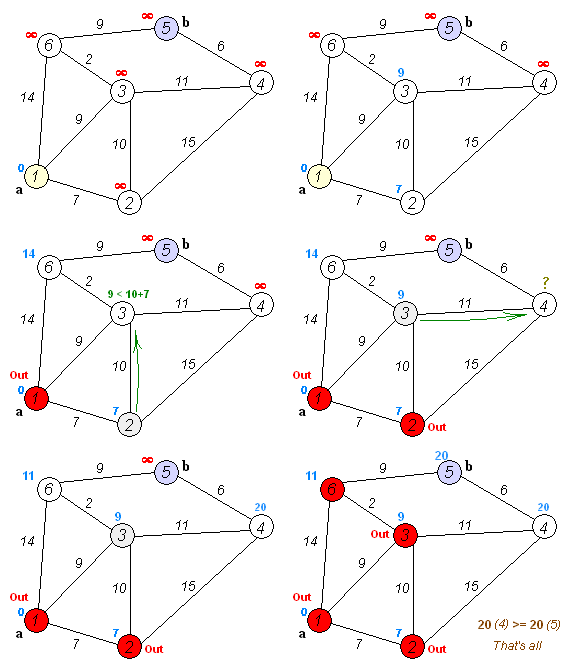
One of the most popular routing algorithms is Dijkstra’s Algorithm. To perform route search we need a data representation of Vertices and Edges connecting those vertices. It is also important to have Cost assigned to edges. If Edge is bidirectional we also need to have Reverse Cost – so we know how expensive is to return back using that same edge.
The algorithm itself uses that information for finding shortest path between provided vertices.
Here is description from Wikipedia
Dijkstra's algorithm. It picks the unvisited vertex with the lowest-distance, calculates the distance through it to each unvisited neighbor, and updates the neighbor's distance if smaller. Mark visited (set to red) when done with neighbors.
Here is another
Illustration of Dijkstra's algorithm search for finding path from a start node (lower left, red) to a goal node (upper right, green) in a robotmotion planning problem. Open nodes represent the "tentative" set. Filled nodes are visited ones, with color representing the distance: the greener, the farther. Nodes in all the different directions are explored uniformly, appearing as a more-or-less circular wavefront as Dijkstra's algorithm uses a heuristic identically equal to 0.
So basically what we need to do is:
Go from each vertex (starting with source vertex) to their neighbours. Important is we always must pick vertex with smallest distance first on each iteration.
Update each vertex with smallest distance (each vertex may be visited through many other vertices so there are many distances per vertex – but we are interested in shortest one)
Also as we update vertex with smallest distance we must store the source vertex from which we came here so later we can reconstruct the path
Once we reach target vertex – that means we have found shortest path.
Lets start by creating main classes for our algorithm
Vertex:
Each vertex has reference to Previous vertex – the source from where during path search current vertex was visited and the cost was shortest
Also each vertex has reference to all neighbour vertices – this is pre-populated before search starts so the search process is as efficient as possible.
Visited flag is set to true when we marked with distances all neighbours of a vertex. If vertex is already visited then it’s neighbours will not be iterated anymore.
Cost – is total distance to the vertex from source vertex.
As you already might noticed there are two types of properties on the class – one is pre-populated and reused between many searches, and the other needs initialization before each search.
Here ID, Neighbours are pre-populated properties – once we initialize the all vertices we can reuse those values between searches.
Other properties need initialization for each vertex in the graph before each search
Visited needs to be set to false for all vertices
Cost needs to be set to max value
PreviousVertex must be set to null
PreviousEdge must be set to null
Here is our Edge class:
SourceVertex and TargetVertex are references to Vertex objects that represent start and end point of an edge
Here Cost does not change from search to search – because this Cost differs from vertex Cost. Vertex Cost updates during search and is distance to the vertex from source, while Cost in edge is distance between start vertex to end vertex.
IsReverse also does not change – this property indicates whether this edge was created using ReverseCost of original edge from database (To avoid confusion I will explain here that database will contain bidirectional edges with values cost and reverse cost showing how expensive is to move from start vertex to end vertex and vice-versa. During search however we need to double edges – the search graph must have 2 edges for each bidirectional DB edge – one with unchanged Source and Target Vertex properties and other with swapped vertices.)
I can say the Edge class properties does not change during search. Once initialized the Edge objects can be reused between many searches
To pass data to graph we need some POCO object representing minimum amount of properties enough for path search.
For simplicity I use the same POCO object to return result from graph search. So there some properties specific to result.
The GraphDataItem class:
Properties used to pass data inside search are:
EdgeID, SourceVertexID, TargetVertexID, Cost, ReverseCost
As you see Clone methods used exactly that set of properties. when returning result from graph I clone the item excluding result-specific properties and I set those in result method without modifying reusable edge objects.
To separate result construction from search algorithm I created dedicated class returning IEnumerable<GraphDataItem> and accepting found target vertex, and some informational properties (time spent to search and tries made before finding target).
Here is GraphSearchResult class:
As you see the result is constructed right in the constructor. the passed vertex is walked to the source using the PreviousVertex reference. PreviousEdge is used to retrieve the original data item and return it too.
So what we have – we can populate GraphDataItem objects collection and pass it to graph, graph will create cache for fast search based on the data we passed in and reuse that cache between many searches. graph will then need to find path is we provide path between which vertices we need and return is using GraphSearchResult helper.
Here is the Graph class:
Graph class has class level variables for in memory representation of all vertices and edges and their interconnection. mEdges and mVertices variables store that schema (keys are IDs of the items stored in values).
Also Graph operates with two types of Vertex ID – original ones provided and in-memory ones – which are sequential for algorithm realization simplicity. mVertexDictionary variable stores the mapping between original and algorithm-related IDs.
The algorithm you see here actually experienced some evolution during development.
To explain the changes and importance of the changes I will return again to very important (critical I would say) point in this algorithm.
I test this algorithm using real data which I obtained by downloading whole country (Georgia – Caucasus) OSM map and processing it using osm2pgrouting which created the SQL script with vertices and edges info. I then imported the script into pgSQL server and after few data conversions was able to import into MS SQL Server, which is desired server for our purpose.
In essence the data required for routing is inside one table named Routes. It looks like this:
I think I will need to write a tool which generates routing table from OSM and inserts it directly to SQL Server. This should be perfect subject for next blog post.
Here we can use source, target, cost, reverse_cost, id as source vertex id, target vertex id, cost, reverse cost, and edge id properties. we can pass this inside our graph class and it will do the job.
To return to the evolution of the algorithm I want to emphasize the size of this routing table.
It has 180 000 + rows representing smallest road segments in the country.
With first version of algorithm I was not able to find path at all – the system was doing very slow iterations and just hang
Second version of algorithm needed about 2-5 seconds to find path between two farthest points in the country.
After optimizations third version needs about 0.1 second on my PC for path between two farthest points in the country.
Please note that we have 180 000 bidirectional edges and after creating in – memory graph we actually have more connections between vertices that in DB table.
Basically the search of nodes is iteration over vertices and their neighbours. If we also remember that one vertex is visited only once we can assume that not much problem should appear if we iterate even over hundred million records. BUT the problem IS – in each iteration we must choose next neighbour to visit. And this is crucial part of algorithm. The next neighbour must have the smallest current distance from the source. And this unfortunately means we need to perform SORT once per iteration. This is extremely slow operation if we consider it will be performed hundred thousand times. First version
In first version I used mVertices.Values.SortBy(vertex => vertex.Cost).FirstOrDefault() to get next vertex to visit.
as you know mVertices has about 180 000 items so the application just died. Second version
In second version I logically excluded from sort vertices that has max value distances.
This is done my maintaining enumerated (estimated) neighbour vertices having non max value distance in separate collection (mNextVertices)
then I just used this code to get next vertex to visit: mNextVertices.Values.SortBy(vertex => vertex.Cost).FirstOrDefault()
This was a huge step forward and I was able to search large paths in 2-5 seconds Third version
The final version is what you see in this blog post now.
I decided that inserting into SortedList should be less expensive operation than sorting unsorted collection.
In second version I was inserting items into unsorted dictionary – and that operation was fast, but during the sort a lot of CPU time was lost.
In this version I insert into SortedList each iteration but I dont need to sort because SortedList is always sorted – I just can take first item)
The result was huge – I need just a fraction of a second to go through very large collection – it is about 0.1-0.2 seconds per largest searches in a country.
Creating CLR Stored Procedure for routing.
After I finished testing the algorithm I decided it will be nice to put this functionality into SQL Server SP. We have all data there – no need to move huge data collections between servers.
There are two potential ways to use the algorithm in procedure
Mark it as UNSAFE and let is cache initialized in-memory graph in static variable. Each search will be fast and reuse the graph. If you go that path please use lock to ensure only one thread search at one given moment. Graph objects are modified during search and one graph object cannot search in parallel.
Mark is as SAFE and don’t use static variable – just initialize graph once per search.This way we don’t need to lock access – for each call we create new graph.
I used first approach in my case, but for blog post I implemented SAFE SP which is more convenient for demonstration purposes. It is easier to deploy as well.
I created database project and added CLR SP
The SP code itself is simple
The SP will accept:
select statement – string which is the select SQL statement returning the below columns for whole graph
EdgeID
SourceVertexID
TargetVertexID
Cost
ReverseCost
source vertex ID
target vertex ID
For our table the SQL statement will be
But the main point here is – we can change SQL later without rebuilding the SP – we can change for example cost criteria and return distance to find shortest path but not fastest etc.
I modified Graph class a little so it can use the SQL statement to fetch the data
Here is added factory method
And that is all actually.
After that I created helper function which returns vertex ID from our routes table by provided Lat/Long pair.
When this is done the SQL wrapper SP for search looks like this:
To test is we simply can run this query:
To demonstrate the usage I created simple maps host application:
After you run it you will see this:
You can make very large path search inside the country:
I will provide a short description of how to run the sample.
First – ge the code here: https://github.com/kirill-chilingarashvili/dijkstra-map-routing-demo
Second – open solution file in Visual Studio 2012
Third (important) – set database project as startup one
Run Important: The database project is set up to create database named “Routing” to localhost – default instance of SQL server. Please make sure you don’t have already database with this name – please read this carefully as I am not responsible for potential damage you can make on your machine.
Next - if deployment succeeded make sample project as startup one
Now run the application.
When you first run it – the routing data will be imported into DB (localhost/Routing again)
This can take a minute or two but this is one-time operation – next time you run the app this will not need to be done again.
That’s all – you can now use app and see Dijkstra’s algorithm implementation in action :)
Happy coding :)
P.S. Well only after three years I understood that there is even better structure than SortedList that can improve performance.
You should use Priority Queue structure which will give better results.
for Sorted List insert is O(n) and accessing an item O(1)
And for Priority Queue insert is O(log(n)) and retrieval is O(log(n)) which is a big deal for large number of nodes.
Often we need to quickly animate something on the screen without initializing storyboards, animations, setting targets etc.
Also sometimes we need to be able to change animation direction or target value.
All this is about double animation.
Suppose we need to move a scroll viewer vertical offset with some speed but depending on user actions we may change speed and even direction of scrolling.
So I wrote a helper class named DoubleAnimationHelper.
You can use it as simple as:
Now if while this animation is in progress you call this code with different offset – the same instance of DoubleAnimationHelper class will be returned by Get factory method – and the previous animation will be graciously changed to new one (it will have the effect of continuing from current point).